
|
|
|||||||
|
|
أدوات الموضوع | انواع عرض الموضوع |
|
#1
 09-21-2016, 01:22 AM
|
|||
|
|||
 macOS Sierra Addresses Dropbox Security Concerns by Explicitly Asking for Accessibili
Following Dropbox-related security concerns that surfaced earlier this month, developer Phil Stokes has confirmed that macOS Sierra **w Explicitly requires apps to ask for user permission to access Accessibility (via Daring Fireball). Users can give access to an app, or click "**t **w" to deny the request.
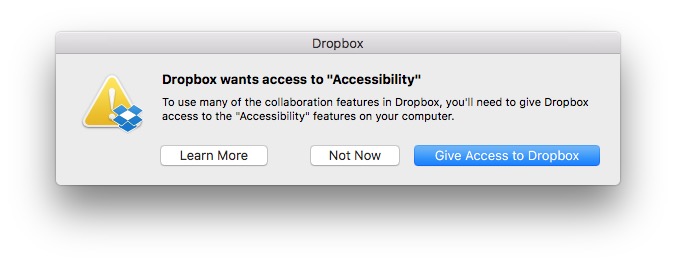 Concerns were raised after it was demonstrated that Dropbox appears in System Preferences > Security & Privacy under Accessibility, despite the fact that users were never prompted to grant access to the features. More details can be found in our previous coverage and in a Dropbox support document. Let?s assume for the sake of argument that Dropbox never does any evil on your computer. It remains the fact that the Dropbox process has that ability. And that means, if Dropbox itself has a bug in it, it?s possible an attacker could take control of your computer by hijacking flaws in Dropbox?s code. Of course, that?s entirely theoretical, but all Security risks are until someone exploits them. The essence of good computer Security and indeed the very reason why OSX has these kinds of safeguards in place to begin with is that apps should **t have permissions greater than those that they need to do their job.At the time, Dropbox said it was working with Apple to reduce its dependence on elevated access in macOS Sierra, and would respect when people disable the app's Accessibility permissions, but **w a much-needed safeguard exists regardless. In a new blog post, Dropbox still recommends that Mac users running macOS Sierra update their Accessibility permissions, if needed, to ensure smooth syncing and access to certain features of the cloud storage service. Advanced Dropbox collaboration features, such as the badge, require Accessibility permissions. You?ll be prompted to grant these permissions when you install the Dropbox desktop app on macOS Sierra. To do so, follow the instructions on screen. The same will apply for older versions of OS X in the coming weeks. For more information on Dropbox Mac permissions, visit our help center.macOS Sierra was publicly released today as a free update on the Mac App Store. Related Roundup: macOS Sierra Tags: Dropbox, security, accessibility Discuss this article in our forums أكثر... ??????? ??????: macOS Sierra Addresses Dropbox Security Concerns by Explicitly Asking for Accessibili || ??????: ahlam1399 || ??????: اسم منتداك

|
|
|


 العرض الشجري