
|
|
|||||||
 |
|
|
أدوات الموضوع | انواع عرض الموضوع |
|
#1
 06-22-2016, 02:26 PM
|
|||
|
|||
 Google Simplifies 2-Step Verification Process With iOS Search App Prompt
Two-factor authentication adds an extra layer of security to users' Google Apps accounts by requiring them to enter a Verification code in addition to their username and password when signing into their account. The two-step Verification Process prevents unauthorized access if someone obtains a user password. 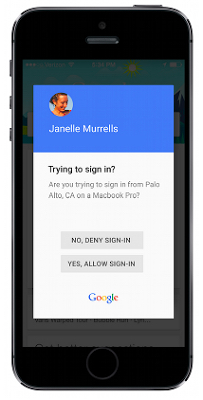 Previously, users had to opt to receive a text message or phone call to get an authentication code, or alternatively use the Google Authenticator mobile app, which generates time-limited numerical codes that users needed to enter into their account log-in page. The change, which is being rolled out from today, means that when a user tries to sign into a Google account With two-step Verification enabled, a **tification from the Google Search app **w asks if they are trying to sign in. A simple tap on the option "Yes, allow sign-in" quickly authenticates the account. 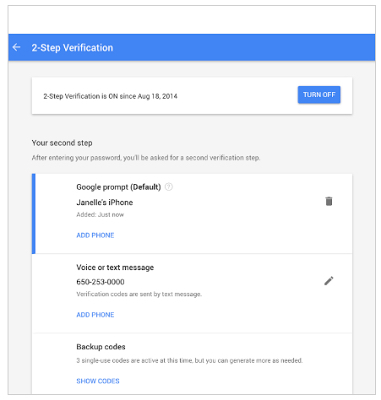 To enable two-factor authentication, users need to sign into Google's My Account section and select Google Prompt under Sign-in & Security -> Signing in to Google -> 2-Step Verification. Google **tes that the option requires a data connection to work, and that it may take up to three days for the feature to appear across all account pages. The Google app is a free download for iPhone and iPad available on the App Store. [Direct Link] Tags: Google, security Discuss this article in our forums أكثر... ??????? ??????: Google Simplifies 2-Step Verification Process With iOS Search App Prompt || ??????: ahlam1399 || ??????: اسم منتداك

|
|
|
|


 العرض العادي

