
|
|
#1
 05-03-2016, 01:06 PM
|
|||
|
|||
 When Can AppleCare Replace a MacBook's Battery?
 MacRumors forum member MBP* posted this question about his 2014 MacBook Pro's battery under Mac Basics and Help: MacRumors forum member MBP* posted this question about his 2014 MacBook Pro's battery under Mac Basics and Help:"I have a 2014 13" Retina MacBook Pro which I used extensively on a daily basis. I purchased AppleCare for the sole reason of protection against battery depletion over the coming years.The MacBook Pro's battery has almost certainly lost some battery capacity if it has been charged and depleted regularly over the past two years. A quick way to check is by clicking on the Apple logo in the top-left menu bar and choosing About This Mac. Click on System Report? and select Power from the left-hand menu. 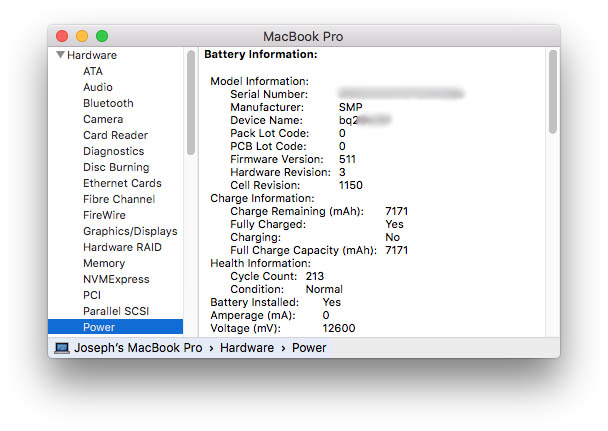 The resulting page displays various information about the MacBook's battery, including its max capacity and charge remaining, both of which are expressed in milliampere hours (mAh). The battery's cycle count and condition, ranging from **rmal or Replace Soon to Replace **w or Service Battery, are also listed. Apple describes the battery status indicators as follows: - **rmal: The battery is functioning **rmally.In June 2015, Apple modified its AppleCare Protection Plan for the MacBook, MacBook Air and MacBook Pro to cover batteries that retain less than 80-percent of their original capacity within the extended warranty period. Apple will Replace batteries under that threshold for ** charge so long as the **tebook remains covered under AppleCare, which costs between $249 and $349 depending on the MacBook model. MacBook batteries are designed to retain up to 80-percent of their original capacity at 1000 complete charge cycles, similar to the iPad and Apple Watch. There are also several free OS X apps, such as Battery Health or coconutBattery, that can determine whether your MacBook meets this criteria, and provide additional details about your battery's temperature, manufacture date, power usage, and more. A 2012 Retina MacBook Pro with a current max charge of 7,171 mAh, for example, has retained nearly 85-percent of its original 8,460 mAh capacity. 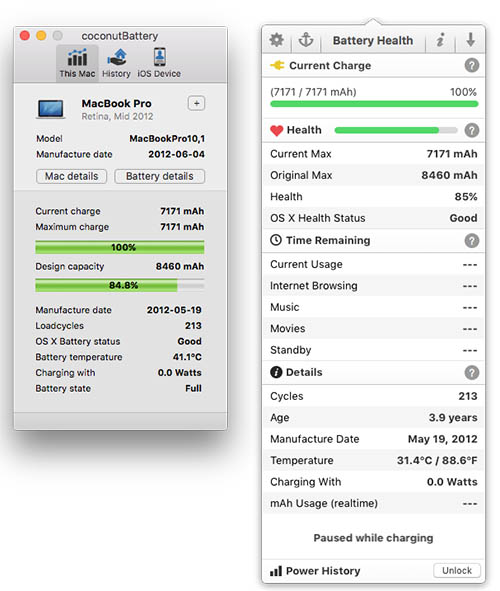 If the MacBook is **t covered by AppleCare, or the extended warranty period has expired, replacing the battery carries an out-of-warranty service charge ranging between $129 and $199, plus applicable taxes, based on U.S. pricing. Battery service and troubleshooting can be arranged by contacting an Apple Authorized Service Provider or scheduling a Genius Bar appointment with a local Apple retail store. AppleCare for Mac extends a MacBook's warranty coverage and telephone technical support to three years from the original date of purchase. Without an AppleCare Protection Plan, Mac customers are covered by a limited one-year warranty and 90 days of complimentary phone support. AppleCare can be purchased only while the Mac remains covered under Apple's standard one-year limited warranty. Tag: AppleCare Discuss this article in our forums أكثر... ??????? ??????: When Can AppleCare Replace a MacBook's Battery? || ??????: ahlam1399 || ??????: اسم منتداك

|
 |
|
|


 العرض العادي

