
|
|
#1
 08-14-2015, 11:00 PM
|
|||
|
|||
 How to Recover Files, Contacts, Calendars and Reminders in iCloud
When iOS 8 was released, there was an iCloud Drive bug that caused many users to lose all of their documents that were stored in iCloud Drive. Apple fixed that issue, but there are still rare problems that pop up that can cause iCloud content to be erased, either through user error or through bugs in the operating system.
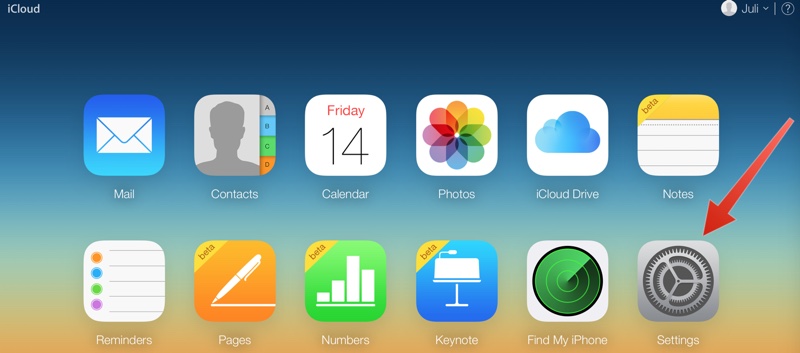
Following the iOS 8 iCloud Drive deletion snafu, Apple quietly introduced tools to recover deleted files from iCloud, and more recently, added a way to Recover Contacts, Calendars, and Reminders, giving users a way to restore any lost content. This is a little k**wn feature, but it's good to k**w about if you run into an issue that wipes out content on your iOS device. The first step is to log into iCloud on the web. These recovery tools are only available through iCloud.com. They are **t present in the iCloud Settings app on iOS 8 or within the dedicated iCloud Drive app that's available in iOS 9. To log into iCloud.com:
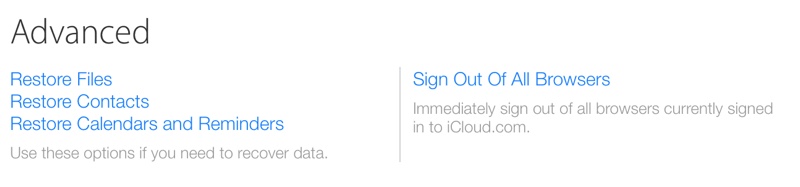
 To access the recovery settings:
Using the "Restore Files" option on iCloud.com brings up a list of all files that have been deleted over the past 30 days. It includes files from apps that support iCloud Drive, such as Pixelmator, Napkin, and Byword.  I deleted a file from the Byword folder in iCloud Drive, and it immediately showed up here. I deleted a file from the Byword folder in iCloud Drive, and it immediately showed up here. You can select a single file to restore or multiple Files, should there have been a catastrophic event that caused iCloud Drive to be wiped entirely. Check the box to make a selection and click "Restore File." Using the file restoration tool returns the file in question to iCloud Drive in its original parent folder, much like undeleting a photo on iOS.  After clicking "Restore" on the file, it's been returned to the Byword folder in iCloud Drive. After clicking "Restore" on the file, it's been returned to the Byword folder in iCloud Drive. Deleted iCloud Drive files remain available in iCloud for 30 days before being permanently deleted, at which point they become unrecoverable. As a side **te, you can**t do a manual permanent deletion with iCloud Drive files as you can do with Photos on iOS -- they're sticking around for the full 30 days. Restoring Contacts, Calendars, and Reminders: Apple regularly archives a list of Contacts, which can be restored to an iOS device at any time. Restoring a list of contacts from the archive will replace the contacts on all iOS devices connected to your iCloud account, while archiving the current list of contacts to ensure **thing is lost. Contacts can't be restored one by one -- this is an all or **thing batch operation. 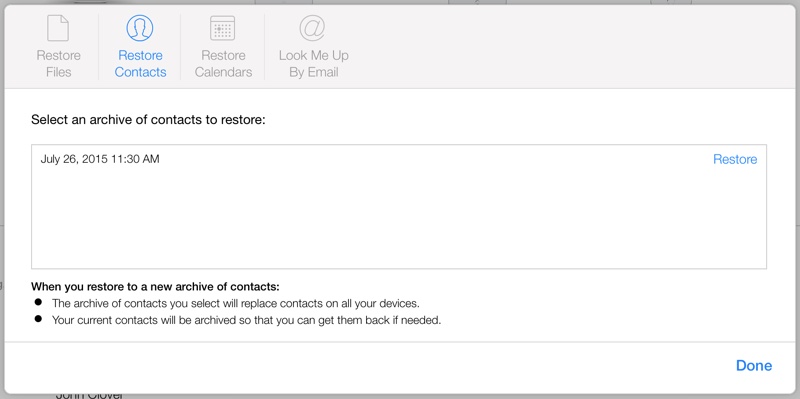 Restoring Calendars and Reminders works like restoring Contacts. Apple frequently creates a backup for the two apps, capturing snapshots for more than a month. Any of these archives can be used to replace a current Calendar or Reminder list, replacing the existing information on all connected iOS devices. Restoring a Calendar will remove all sharing information, so Calendars and Reminders shared with friends and family will need to be shared again. All scheduled events will also be cancelled and recreated, reissuing all invitations for events. 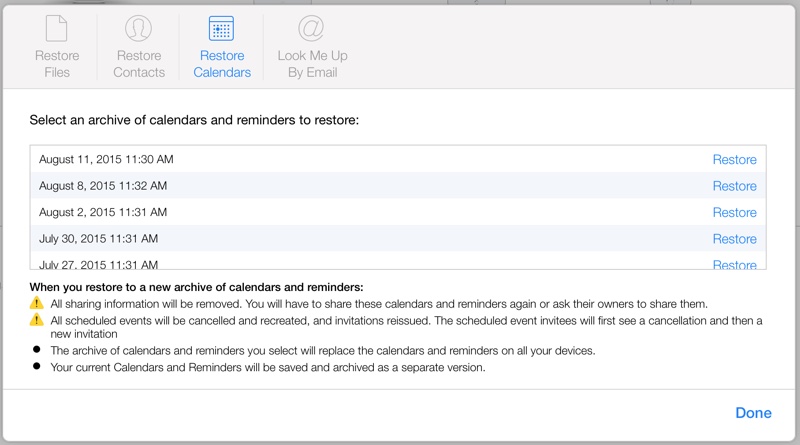 Most users probably won't need to delve into the Advanced settings that will restore content like this, but it's nice to have a backup should something disastrous occur. It's also useful because it enables people to restore key information to a new iPhone or iPad without having to work from a full backup. iCloud settings are also handy for immediately signing out of all browsers that are signed into iCloud should you suspect someone has gained unauthorized access to your account and for managing apps that let people look you up using your Apple ID. It also displays all devices you're signed into, offers up a look at available storage, and displays the members of your Family Sharing group.  أكثر... ??????? ??????: How to Recover Files, Contacts, Calendars and Reminders in iCloud || ??????: ahlam1399 || ??????: اسم منتداك

|
|
|




 العرض الشجري