
|
|
#1
 09-15-2013, 12:37 PM
|
|||
|
|||
 Embed Google+ Posts
One of the things I don't like about Google is that it's hard to Embed content from Google+. You can't Embed photo albums, you can't Embed videos uploaded to Google+, you can't add a widget that shows your latest Google posts, at least **t officially. There are workarounds, but these are features that should be added by Google. Picasa Web Albums had a cool slideshow widget, YouTube lets you Embed videos and almost any other Google content service supports feeds. There's a new Google feature that somewhat addresses these issues. You can **w Embed almost any public Google post: just mouse over the post, click the arrow icon and click "embed post". You'll get some code you can quickly add to a blog post.  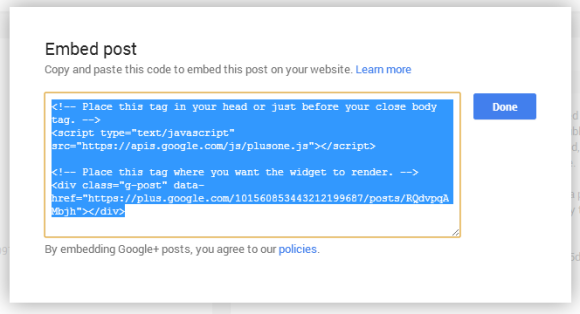 If you already use other Google widgets and you've switched to asynchro**us JavaScript loading, you can leave out the first part of the code and only add the div tag (the code that starts with ""). The embedded post looks just like a Google post from the homepage, so you can only read the first sentences of the post and the most recent comment. Obviously, you can expand the post and the list of comments. "Text, photo, and media Posts are all supported, and the embeds are fully interactive, so visitors can +1, comment and follow inline," informs Google. Here's an example: This page has more information about the Google embedding code. If the post includes a video uploaded to Google+, the video will play in a new page. If the post includes a Google photo or photo album and users click a photo, a new page will open and they'll see the Google image view. This feature is limited to public posts. You can't Embed Posts from a community, Posts restricted to a Google Apps domain, private posts, event Posts and Hangout on Air posts. 
|
 |
|
|


 العرض العادي

