
|
|
|||||||
 |
|
|
أدوات الموضوع | انواع عرض الموضوع |
|
#1
 05-24-2017, 08:47 AM
|
|||
|
|||
 1Password Gains 'Travel Mode' to Protect Sensitive Data When Traveling
When activated, Travel Mode will remove every password vault from all of a user's iOS and Mac devices except for vaults that have been earmarked as "safe for travel," effectively hiding a user's most Sensitive information. Travel Mode is available to all customers who have a 1Password membership. 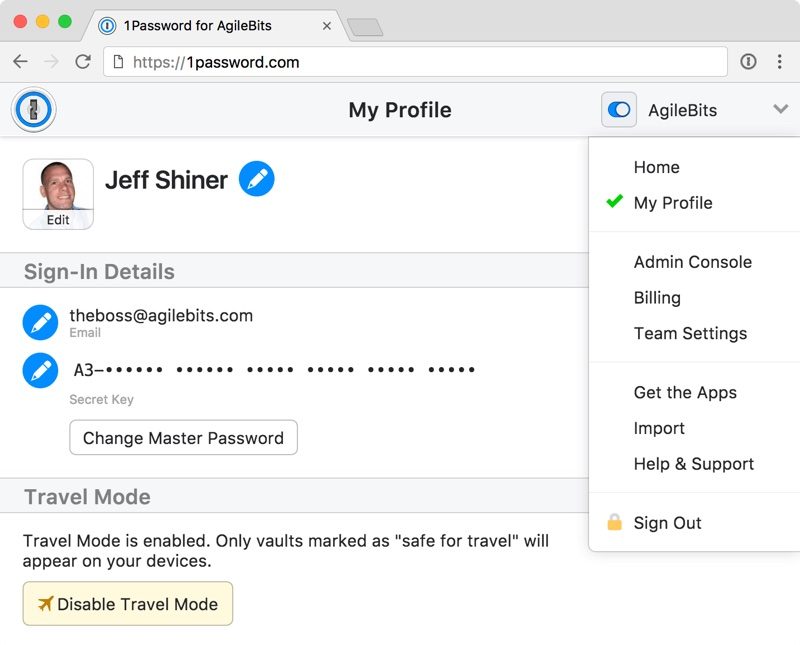 Before Travel Mode, I would have had to sign out of all my 1Password accounts on all my devices. If I needed certain passwords with me, I had to create a temporary travel account. It was a lot of work and **t worth it for most people.Once a user arrives at their destination, Travel Mode can be toggled off and the vaults return to all of a user's devices. AgileBits has a detailed support document outlining how to use Travel Mode. Vaults are **t hidden with Travel Mode, but instead are completely ******* from all devices as long as Travel Mode is turned on. AgileBits says that there are ** traces left for anyone to find, and there are ** signs that a special mode has been enabled. With 1Password for Teams, Travel Mode allows the team administrator to turn Travel Mode on and off for employees, giving companies a way to make sure their Data stays safe. 1Password can be downloaded from the App Store for free, but there is an in-app fee to access the service. A standard 1Password account is priced at $2.99 per month and a multi-user family account is priced at $4.99 per month. There is an additional fee When purchasing a subscription through the App Store, and there are also separate subscription options for teams. - 1Password for Mac [Direct Link] - 1Password for iOS [Direct Link] Tags: 1Password, AgileBits Discuss this article in our forums أكثر... ??????? ??????: 1Password Gains 'Travel Mode' to Protect Sensitive Data When Traveling || ??????: ahlam1399 || ??????: اسم منتداك

|
|
|
|


 العرض العادي

