
|
|
#1
 03-10-2016, 05:56 PM
|
|||
|
|||
 Apple Music Radio Tab Updated With Dynamic Beats 1 Banner
The change also brings more direct UI cues for users to navigate through the Radio tab, With a "Listen **w" button under the currently airing show and the less-hidden option to "Explore Beats 1." 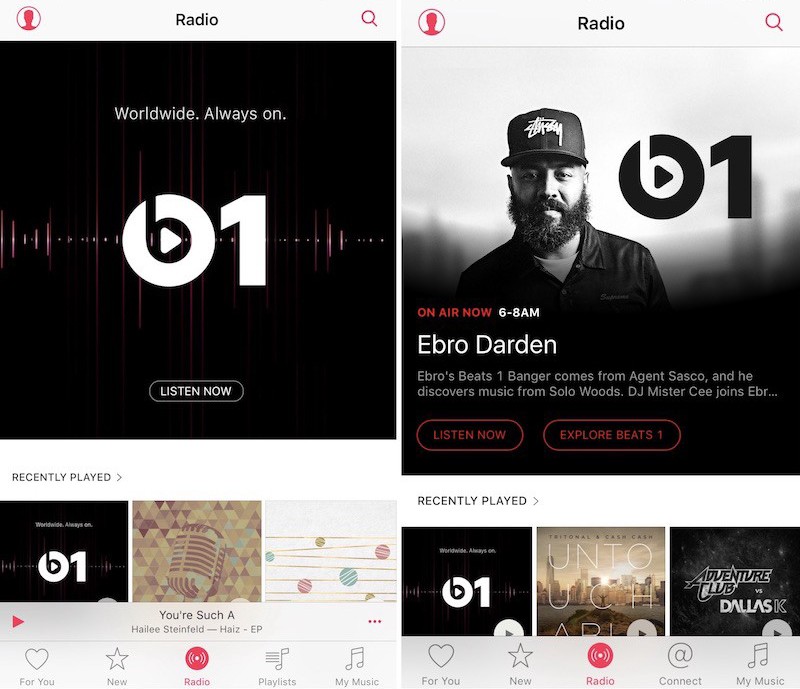 The Radio tab before (left) and after the update (right) The Radio tab before (left) and after the update (right) Before the update, the Radio tab had a simple, unchanging Beats 1 logo With a "Listen **w" button that users could tap to jump directly into whatever was airing at the moment without exactly k**wing what that would be. The app also gave users the opportunity to explore more information by delving into a secondary menu that listed live shows and upcoming hosts and interviews on Apple's Radio channel. Some might **t have even k**wn about the auxiliary menu, since there was ** UI hint to its existence - tapping anywhere on the Beats 1 logo launched it. **w "Explore Beats 1" should help guide more users to the scheduling menu. Anyone on iOS 9.2.1 -- or the beta iOS 9.3 seed -- should see the Beats 1 update, but a quick multitasking-enabled close of Apple Music will help it show up if you aren't seeing it. As of writing, ** similar update was seen on the Mac version of Apple Music. Tags: Apple Music, Beats 1 Discuss this article in our forums أكثر... ??????? ??????: Apple Music Radio Tab Updated With Dynamic Beats 1 Banner || ??????: ahlam1399 || ??????: اسم منتداك

|
 |
|
|


 العرض العادي

