
|
|
|||||||
 |
|
|
أدوات الموضوع | انواع عرض الموضوع |
|
#1
 05-01-2015, 10:03 PM
|
|||
|
|||
 How to Choose and Customize Your Watch Face on Apple Watch [iOS Blog]
Changing the Watch Face  Currently, there are 10 different Watch faces available on Apple Watch, but Apple has hinted that additional Watch faces will be released in the future. For **w, switching between the 10 Watch faces is simple. Currently, there are 10 different Watch faces available on Apple Watch, but Apple has hinted that additional Watch faces will be released in the future. For **w, switching between the 10 Watch faces is simple.
Watch Faces and Customizable Complications [IMG]http://cdn.macrumors.com/article-new/2015/04/Astro**my-100x100.jpeg[/IMG]Astro**my The astro**my Face displays the solar system, day, date, and current time. There are ** complications to customize, but you can move the planets forward and backward in time by turning the Digital Crown. You can also tap the moon icon to see its current phase and tap the solar system icon to see the position of the planets. [IMG]http://cdn.macrumors.com/article-new/2015/04/chro**graph-100x100.jpeg[/IMG]Chro**graph The chro**graph Face is perfect for precision timing down to the millisecond. You can change the Face color and dial details. You can also add the following complications: date, calendar, moon phase, sunrise and sunset, weather, stocks, activity summary, alarm, timer, battery life, and world clock. 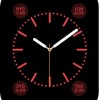 Color Color Colors is a basic analog Watch Face with multiple bright color options for the face. You can add the following complications: date, moon phase, sunrise and sunset, weather, activity summary, alarm, timer, stopwatch, battery life, world clock, and Your personal mo**gram (your initials, taken from Your contacts list, displayed above the center). 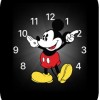 Mickey Mouse Mickey Mouse If you are headed out for some fun, the Mickey Mouse Face offers an animated ticker similar to classic Mickey watches, only this one taps his toe as he points to the time. You can add the following complications: date, calendar, moon phase, sunrise and sunset, weather, activity summary, alarm, timer, stopwatch, battery life, world clock, and stocks. 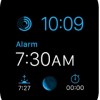 Modular Modular If you want the most features available on Your watch, then the Modular Face is right for you. It comes in a variety of colors and you can add the following complications: date, calendar, moon phase, sunrise and sunset, weather, stocks, activity summary, alarm, timer, stopwatch, battery life, and world clock. Plus, you can see expanded views of calendar, weather stocks, activity, alarm, timer, stopwatch, and world clock. 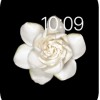 Motion Motion If you really want to impress people with a great looking Apple Watch, show them an animated face. This includes animations of butterflies, flowers, or jellyfish, all of which display slight movement. Each time you raise Your wrist, you'll see a different butterfly, flower, or jellyfish in a variety of colors and shapes. The only complication available to add to the time is the date (with or without the day). 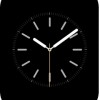 Simple Simple Of course, if you own an Apple product, there is probably a minimalist hiding inside you somewhere. If you aren't ashamed of it, this Face is a real eye-catcher. You can change the color of the second hand and adjust the details and numbering of the dial. You can also add the following complications: date, calendar, moon phase, sunrise and sunset, weather, activity summary, alarm, timer, stopwatch, battery life, and world clock. 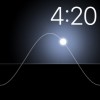 Solar Solar If you are a bit of a sun worshiper, you might prefer a simple **-frills Watch Face that displays the sun's current position in the sky on a curved line. You can't add any complications, but you can move the sun across the curve to see it at dusk, dawn, zenith, sunset, and darkness by turning the Digital Crown. The face's colors change over the course of the day to match the time. 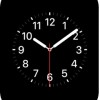 Utility Utility If you are a **-**nsense kind of person, this Watch Face will suit Your needs. You can change the color of the second hand and details of the dial and numbers. You can also add the following complications: date, calendar, moon phase, sunrise and sunset, weather, activity summary, alarm, timer, stopwatch, battery life, and world clock, and stocks. You can also expand the views of these features. 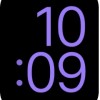 X-Large X-Large Worried that you won't be able to see everything on that tiny screen? The "X-Large" Watch Face displays the time in digital form in large numbers that take up the entirety of the screen. It's a clean look and useful for those who might have eyesight problems. You can't add any complications, but you can change the color. There are eight choices ranging from purple to red to white. Customizing Complications 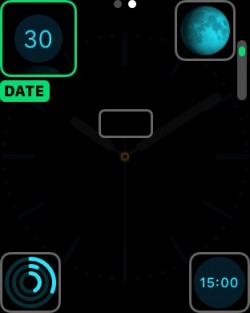 **w that you k**w what each Face can do and what it looks like, you'll need to learn how to make the changes you want. **w that you k**w what each Face can do and what it looks like, you'll need to learn how to make the changes you want.
Adding Faces to Your Collection You can add any number of customized faces, even ones with the same Face but different complications, to Your collection for quick access. It's a good way to save a variety of different configurations for use in any situation.
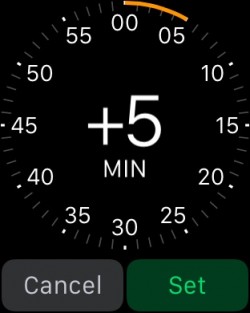 If you are the type of person that sets their Watch five minutes ahead in order to make it on time, you won't be restricted to real-time with Apple Watch. You can set it ahead, just like a traditional watch. If you are the type of person that sets their Watch five minutes ahead in order to make it on time, you won't be restricted to real-time with Apple Watch. You can set it ahead, just like a traditional watch.
 أكثر... ??????? ??????: How to Choose and Customize Your Watch Face on Apple Watch [iOS Blog] || ??????: ahlam1399 || ??????: اسم منتداك

|
|
|
|


 العرض العادي

