Earlier today,
Apple launched their much anticipated
Apple Music streaming service. The iPhone app includes dedicated tabs called "For You", "New", "Radio", "Connect", and "My Music". The first two tabs offer areas for
Music discovery, while "Radio" provides themed stations as well as Apple's own Beats 1 Radio. Meanwhile, the last tab, "My Music" provides you
with access to the rest of your existing
Music catalog as well as any new songs you might add from
Apple Music.
The "Connect" tab, however, is a new service from
Apple which is described as a place where "musicians give their fans a closer look at their work, their inspirations, and their world." Similar to a social network, it allows users to "follow" their favorite artists and see additional content.
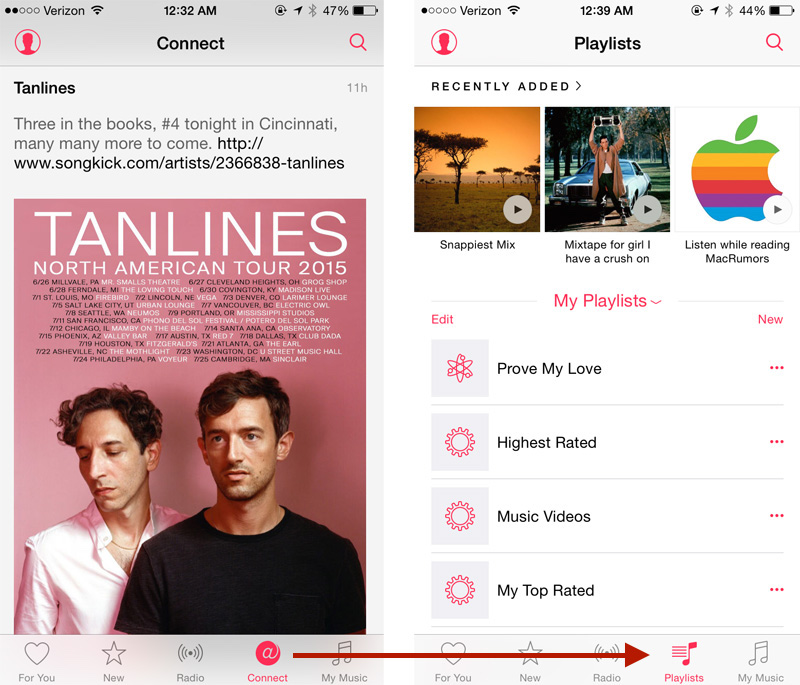
If "Connect" doesn't interest you,
MacRumors reader Eric points out a handy tip to
Replace the "Connect" tab
with a dedicated "Playlists" tab which he describes as "much more useful".
Under Settings -> General -> Restrictions,
Apple allows you to disable "Apple
Music Connect" which removes the Connect tab and provides the alternate Playlist functionality.
Thanks Eric


 أكثر...